100% freeFor Form 140 (26Q) and Form 144 (27Q) statements

See the TRACES notice before it arrives.

eTDS Notice Forecaster reads your eTDS statement text file and lists the defaults CPC-TDS is likely to raise in its Justification Report: short deduction, short payment, interest and late fee. You can correct the statement before you file it, instead of answering a notice afterwards.

Free · Version 2.0 · 09-Oct-2026 · Windows 10 / 11 · 18.2 MB · No installation

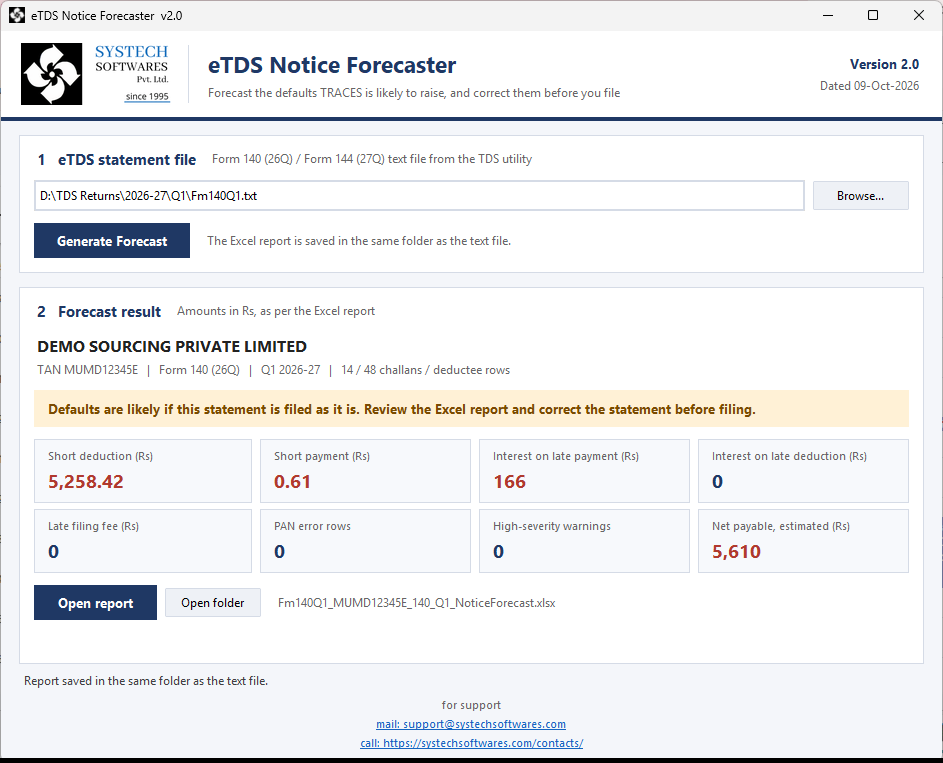
eTDS Notice Forecaster window showing a forecast for a sample statement: short deduction Rs 5,258.42, short payment Rs 0.61, interest on late payment Rs 166 and net payable Rs 5,610
Forecast for a sample Form 140 statement (fictitious data)

Free to download and use

No price, no licence key and no registration. Download it and use it for all your statements.

Before filing, not after the notice

Every default comes with the reason and a suggested fix, so the statement can be corrected while it is still in your hands.

Your data stays on your PC

The program works offline. The statement is read on your computer and nothing is uploaded anywhere.

An Excel report your team can act on

One workbook, with a summary in the Justification Report format and a sheet for each type of default.

What it checks

The defaults that turn into TRACES demands

The checks follow how CPC-TDS computes defaults: TDS to the paisa, interest by calendar month or part, and the payable rounded to the nearest Rs 10.

Short deduction

  • TDS rate checked against the section code
  • Higher rate where the PAN is missing or invalid
  • Zero-TDS rows once a deductee crosses the threshold
  • Lower-deduction certificates u/s 395(1): validity dates and amount limit
  • Form 144: Act rate plus cess, and DTAA rate not allowed without PAN
  • Paise shortfalls that CPC still raises

Short payment

  • Deductee TDS tagged to a challan compared with the challan amount
  • Paise in deductee TDS not covered by a whole-rupee challan
  • Same challan quoted in more than one challan record

Interest on late payment

  • 1.5% per month or part, from deduction date to deposit date
  • Due 7th of next month (30 April for March deductions)
  • Same-day due date for Government book entry
  • Compared with interest already paid in the challan

Interest on late deduction

  • 1% per month or part, from date of payment or credit to date of deduction
  • Worked out row by row, as CPC does

Late filing fee u/s 427

  • Rs 200 per day after the quarter's due date
  • Capped at the TDS in the statement

PAN errors

  • PANNOTAVBL, PANAPPLIED and PANINVALID rows
  • PANs in the wrong format
  • Listed the way TRACES lists them, even where no tax is short

Risk warnings

  • Same PAN quoted for unrelated deductees
  • Section meant for Individual/HUF used for another PAN category
  • Challan dated before the deductions it pays for
  • Deductor type not matching the deductor PAN
  • Record counts and totals that don't match

Net payable estimate

All defaults added up, less interest already paid, and rounded to the nearest Rs 10, the way CPC presents the demand.

How it works

Three steps, about a minute

  1. Prepare the statement

    Generate the Form 140 (26Q) or Form 144 (27Q) text file from your TDS utility as you normally would.

  2. Generate the forecast

    Open eTDS Notice Forecaster, browse to the .txt file and click Generate Forecast.

  3. Correct, then file

    Review the Excel report saved next to the text file, fix the rows it points to, and file a clean statement.

Screenshots

The program and its report

All screenshots use a sample statement with fictitious deductor and deductee details. Click a picture to enlarge it.

What's in the Excel report

  • Summary
  • Short Deduction
  • PAN Error
  • Short Payment
  • Interest Late Payment
  • Interest Late Deduction
  • Warnings
  • Challan Allocation

Download

eTDS Notice Forecaster 2.0 Free

Released 09-Oct-2026. Free to download and use: no licence key, no registration. One program file and one settings file, with nothing to install.

Free download for Windows (ZIP, 18.2 MB)
Price
Free
File
eTDS_Notice_Forecaster_v2.0_Windows.zip
Works on
Windows 10 and Windows 11 (64-bit)
To view the report
Microsoft Excel or any spreadsheet program
SHA-256
248f84449e00ee50778944edcc1ddba1eedb46ef159abed7383b08348d0e79e2

Getting started

  1. Unzip the download to a folder, for example C:\eTDS Notice Forecaster.
  2. Keep etds_forecaster_config.json in the same folder as the program. It holds the section rates, thresholds and lower-deduction certificates.
  3. Double-click eTDS_Notice_Forecaster.exe.

If Windows shows "Windows protected your PC": this can appear for newly released programs. Click More info, then Run anyway.

Good to know

The Forecaster works only from the statement file, so some checks that need TRACES data are outside its reach. It flags the risk where the file itself shows one.

  • It does not check whether a PAN is inoperative or not linked with Aadhaar.
  • It cannot see challan balance already used in other statements. Older challans are flagged for you to check on TRACES.
  • It cannot see lower-deduction certificate usage outside this statement. Enter the amount already used in the settings file.
  • Interest is estimated up to the filing date plus processing days. CPC calculates up to the date of its order, so the final figure can differ slightly.

FAQ

Common questions

Is it really free?

Yes. eTDS Notice Forecaster is free software from SYSTECH Softwares. There is no price, no licence key and no registration.

Which files can it read?

The eTDS statement text file (.txt) for Form 140 (earlier 26Q) and Form 144 (earlier 27Q), as produced by your TDS utility before validation and filing.

Does it upload my data anywhere?

No. Everything runs on your computer and no internet connection is needed. The Excel report is saved in the same folder as the text file.

Does it file the return or change my statement?

No. It only reads the text file and writes a separate Excel report. You correct the statement in your TDS utility and file it as usual.

Can I change the section rates and thresholds?

Yes. They are kept in etds_forecaster_config.json next to the program. You can also add lower-deduction certificates u/s 395(1) with their rate, limit and validity. Changes apply the next time you generate a forecast.

How close is the forecast to the actual Justification Report?

Short deduction, short payment and PAN errors are worked out the same way CPC does. Interest is an estimate because CPC calculates it up to the date of its order. Checks that need TRACES data are listed under Good to know above.

Do I need Microsoft Excel?

Only to open the report. Any program that opens .xlsx files will do.